
A development agency would have quoted this build at between $100,000 and $193,000. Seven specialists. Fourteen to twenty weeks. A workers-comp lawyer, a technical writer, a UX designer, a frontend developer, a QA engineer, a project manager and a backend developer.
I built it in fifteen hours travelling on the train to and from work and sitting on my couch at home, all for the price of a monthly subscription.
Here’s the part that annoys me and should annoy you too: I built the whole thing from my phone. Thumb-typing into the Claude app, taking screen shots and asking Claude to change x, y and z. No laptop. No code editor. No dev environment.
Why? I didn’t know about Claude code, I just assumed Claude on my mobile was the same. It took me 8 weeks to realise they are not the same. I could have wrapped this whole project up in 60 minutes or less.
I’m clearly not a developer. I’m not a designer. By day I manage an insurance program.
One real tool, live on the internet, with a full paper trail: the first prompt, the cost breakdown, the exact number of prompts, and a demonstration of what can be done.
Here’s the whole story.
What I actually built
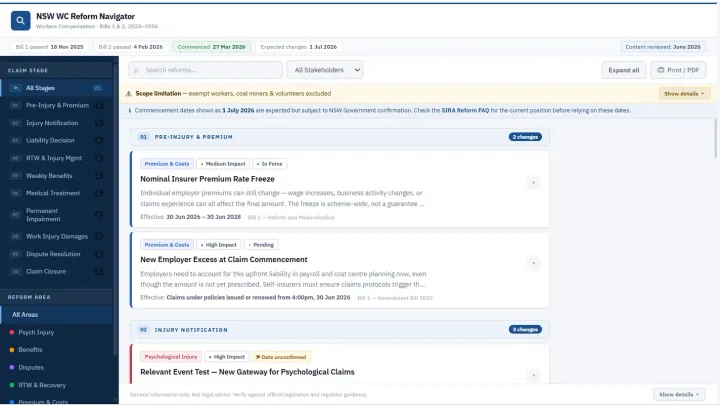
It’s called the NSW Workers Compensation Reform Navigator. An interactive reference tool that maps a dense legislative overhaul — Bills 1 and 2 of 2025–2026 — onto the claim lifecycle, so a practitioner can see exactly where each reform applies and what it means in practice.
It’s live right now: nsw-wc-reform-navigator.netlify.app
Not a landing page. A genuine working tool:
- 21 reform entries mapped across 10 claim lifecycle stages, from injury notification to claim closure.
- Four structured fields per entry: what changed, the practical implication, the audit relevance, and the icare QA themes.
- Filter by claim stage, stakeholder type, or reform area. Full keyword search.
- Aligned to the icare and SIRA audit framework, so practitioners can cross-reference their obligations against what auditors actually look at.
- Accessible: ARIA labels, keyboard navigation, skip links, colour-independent tagging.
- One responsive HTML file. Print/PDF mode. Deployed live to Netlify.
The users are injury managers, RTW coordinators, employers, self-insurers, and claims managers. Real people with a real problem: the law changed, and nobody had turned it into something you could use.
The one prompt that started it
The entire project began with a single message at 7:17 on a Monday morning. No code. No mockup. A clear description of what I wanted and who it was for:
“I want to build an interactive reference tool that maps the recent legislative reform changes to NSW workers compensation. The tool should display changes clearly against the claim lifecycle, from injury notification through to claim closure… Users will include injury managers, RTW coordinators, employers, self-insurers, and claims managers. I want the tool to align with the icare and SIRA audit framework… Each reform change should show what changed, when it took effect, who it applies to, and what the practical implication is at that stage. Make it visual, easy to navigate, and interactive. Get the information from current sources. Build it so users can filter by claim stage, stakeholder type, or reform area.”
From that one prompt, Claude ran live web research across SIRA, icare, the NSW legislation register, Herbert Smith Freehills, and Lockton — then structured 21 reform entries and delivered a working tool in the same session.
The prompt wasn’t clever. It was specific. It said what, for whom, structured how, and sourced from where. That’s the whole trick, and I’ve put the full prompt — plus the follow-ups that did the heavy lifting — in a free pack at the end.
The $100,000 breakdown
I asked Claude to cost the same build conventionally, at current Australian contractor rates. Here’s what a team would have charged:
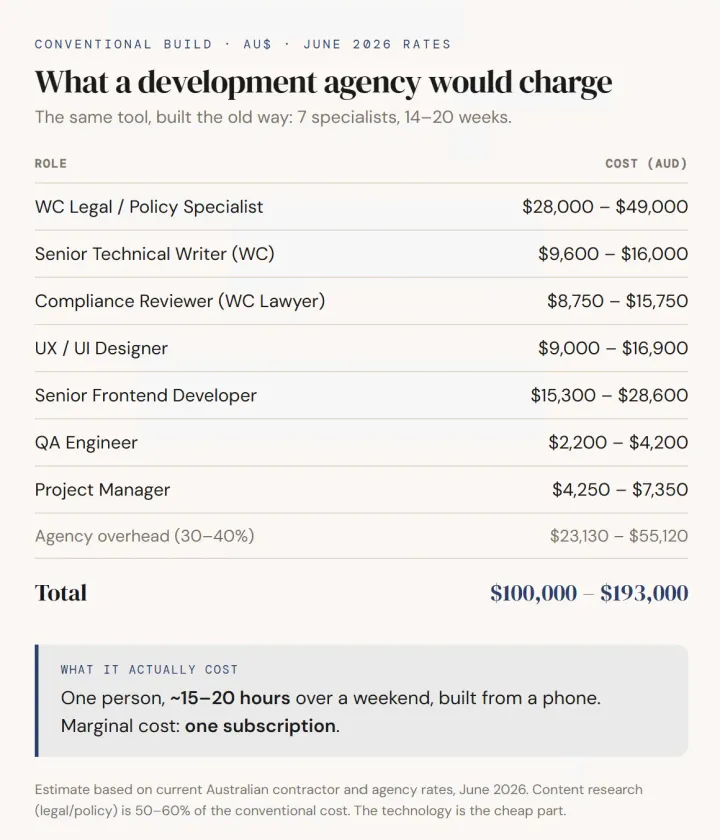
Look at where the money goes. It’s not the code. The legal and policy research, the practitioner-grade content is 50–60% of the cost. The technology is the cheap part.
That’s the whole insight. AI replaced the expensive expertise.
What 57 prompts over two days actually looked like
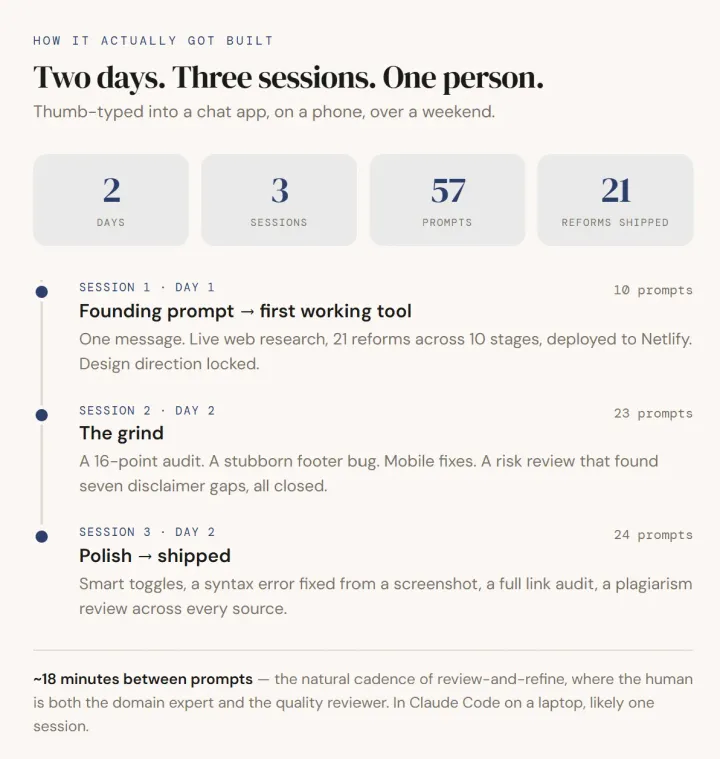
It took 57 prompts across three sittings over two days, roughly 15 to 20 hours of work.
Here’s how it went
- Session 1 (10 prompts): A 45-minute train ride to work, the founding prompt, live research, first working tool. It took less than 25 minutes for the site to be generated and another 20 minutes to change it to a HTML site.
- Session 2 (23 prompts): the I don’t trust Ai grind. A 16-point audit. A stubborn footer bug that ate several prompts. Mobile fixes. A media-and-publishing risk review that found seven disclaimer gaps, all closed.
- Session 3 (24 prompts): polish. Smart toggles with session memory. A syntax error I diagnosed from a screenshot. A full link audit. A plagiarism review across every cited source.
Average time between prompts: about 18 minutes. That’s not the AI being slow. That’s me, reviewing the output on my phone screen, spotting the next fix, thumb-typing back a specific instruction.
And here it is once again; a lot of that prompt count is because I used the browser version of Claude. I naively used chat app, on a phone copying, pasting, and re-describing across three separate sessions. Done properly in Claude Code on a laptop, this is very likely a single session with a fraction of the back-and-forth. So read “57 prompts” as the slow, hard-mode version. It still beat a $100,000 agency quote by two days.
This is the actual shape of AI-assisted building. AI is the entire production team; I’m the just the orchestrator.
The part that wasn’t AI
Claude knew nothing about NSW workers compensation until I brought fifteen years of it. The tool is only useful because the substance underneath it is correct and judging what’s correct in a specialist scheme is not something you can prompt your way to.
Three things were entirely mine:
- The expertise. Knowing which 21 reforms mattered, how they map to the lifecycle, and what a practitioner actually needs at each stage. Fifteen years, not fifteen hours.
- The quality judgement. Every “that’s wrong, fix it” in those 57 prompts came from me knowing the domain. The AI can’t grade its own accuracy in a field it doesn’t understand.
- Deciding it should exist. No AI told me this tool was needed. The what and the why were mine. Claude only ever handled the how.
Strip those out, and you get a slick, confident, wrong tool built very fast. Keep them, and the AI turns one expert into an entire delivery team.
How to do this yourself
You don’t need to be technical. You need to be the expert in something, and willing to run the review loop. Here’s the start:
- Pick the thing only you understand well. A process, a regulation, a dataset, a workflow your industry gets wrong. Your expertise is the moat the build is now cheap.
- Write one specific founding prompt. What you’re building, who it’s for, how it should be structured, where to source the facts. Specificity beats cleverness every time.
- Run the loop. Look at the output. Find the next flaw. Come back with one clear instruction. Repeat. Eighteen minutes at a time, it compounds fast.
- Make the AI attack its own work. My best prompts weren’t build prompts they were audits. “Assume this is wrong and find the gaps.” That’s where the polish came from.
The tool took a couple of days. The knowledge took fifteen years. That ratio is the opportunity, and AI provides me with scope to speed run my ideas.
If this was useful, do two things: subscribe so the next build breakdown lands in your inbox, and send this to one person who keeps saying they’d build something “if only they could code.” They can now.
I’ve packaged the exact prompts behind this build — the verbatim founding prompt plus the audit, risk-review, and plagiarism-check prompts that did the real work — into a free One-Prompt Build Playbook. Subscribe here and the welcome email will send you the download